AI Copilot
Describe what you want in plain language and the built-in copilot proposes designs, mappings, portals and workflow changes for your approval.
See this on the STRAX product page →
Describe the outcome, review the proposal
STRAX includes an AI copilot that works in plain language. It knows your own estate: the systems you have connected, their tables and fields, your mappings, workflows and portals. Ask it which systems feed the customer table, why a job failed last night, or which fields still lack a description, and the answer concerns your installation rather than integration in general.
The copilot also builds. Tell it "Demo ISP needs a portal where customers see their Splynx invoices and their open Zendesk tickets", and it proposes the table designs, mappings, pages and workflow changes needed to deliver that. Larger pieces of work start as a written specification you can read, comment on and refine section by section before anything is built.
Nothing is applied without your approval
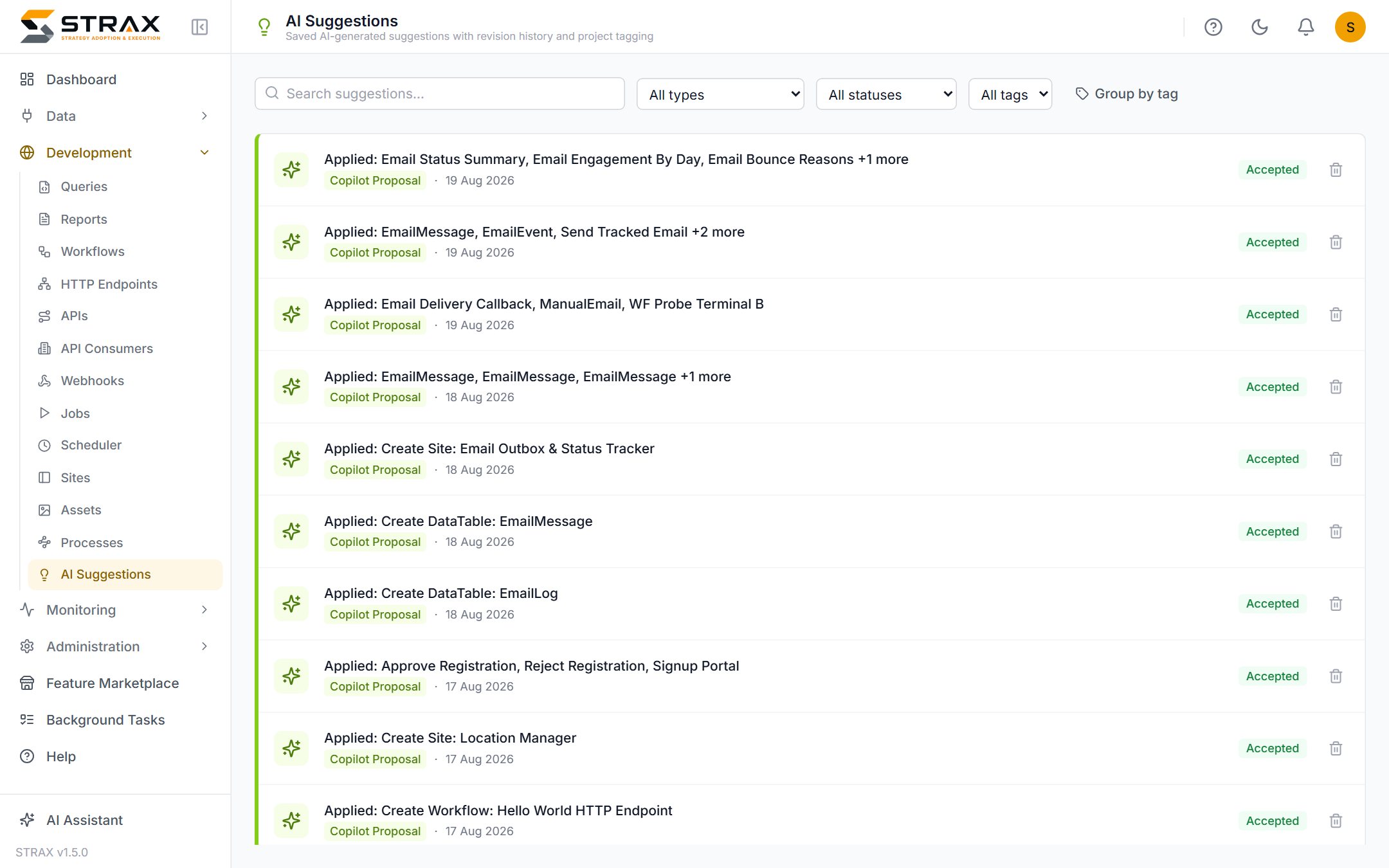
Every change the copilot produces arrives as a reviewable proposal. You see exactly what it intends to change, accept it or reject it, and only an accepted proposal is applied. The copilot cannot alter your integration behind your back, and the review step is recorded, so there is always an answer to who approved what and when.
The same applies when a workflow needs a code library the installation does not have yet. The copilot can find a suitable package on NuGet, preview its licences and warnings, and propose it together with the workflow that uses it. Only an administrator can approve bringing the package in.
This matters because AI output is fast and plausible rather than guaranteed. The most common error in any AI-assisted integration is a sensible-looking mapping onto the wrong column, and a human review catches it in seconds. STRAX makes that review a built-in gate rather than a discipline teams must remember to apply.
Suggestions where the work happens
Beyond conversation, AI assistance runs through the routine work of integration.
- Field mapping suggestions propose column pairs between a source system and your canonical model, shown beside the schema they apply to so each is easy to judge, with batch acceptance for the obvious ones.
- Table mapping suggestions propose which source tables correspond to which hub tables.
- Description suggestions draft plain-language documentation for systems, tables and fields.
- Log analysis reads a failed job's output and explains the likely cause in plain terms.
All of these land in the same review queue, pending a person's acceptance or rejection. Mapping a newly connected system that once took days of column-by-column work becomes an afternoon of review.
Bring your own model
The copilot runs on the language model you choose. STRAX supports the major AI providers, and it equally supports a private model hosted inside your own network, which suits organisations whose data governance rules keep AI traffic on premises. Model choice is a configuration setting, so you can change provider without changing how you work. Portals can carry their own separately configured assistant for end users, restricted to exactly the capabilities the portal's builder permits.
Better descriptions, better answers
The copilot draws on what you have written about your estate. A system described as "Splynx: billing, source of truth for invoices" produces markedly better proposals than one left blank, so the documentation the platform encourages you to keep pays for itself twice.
Your organisation introduces itself once, in an installation profile: who you are, the strategies to follow and the rules that apply, such as which system is the master for balances or when nothing may be deployed. STRAX adds live facts about the installation, and the copilot reads the profile at the start of every conversation, together with a list of the core documents it must consider before proposing anything. Customer-facing assistants, on a portal or in an AI reply workflow, use a separate public profile, so internal strategy never reaches a customer.
Bring your own AI client
The copilot is not the only assistant that can work with STRAX. Through the Model Context Protocol, the assistants your teams already use (Claude, Claude Code, Cursor, VS Code or an internal AI gateway) can connect to an installation with a key you issue. Each key is granted exactly the capabilities it needs: reading the estate's configuration, running validations, querying business data (with policies that limit an assistant to the entities, columns and rows it should see), or proposing changes. A connected assistant is told to read the same installation profile first, so it works to your strategies rather than guessing them.
An assistant never changes configuration directly. Its changes arrive as proposals, checked by the same validation as the copilot, and they land in staging first. By default the assistant applies a proposal after showing it to its own user. You can require console approval instead, for the whole installation or for particular keys: the assistant's approval then only submits the proposal, and a person on your team approves or rejects it in the STRAX console. The reviewer sees each change the way the copilot shows its own proposals, such as a workflow with its steps or a report with its theme, so the decision is made on what will change rather than on raw data. A proposal that brings in a code library always waits for an administrator in the console. Production actions need a separate permission and an explicit confirmation, and every call is written to the audit trail under the key's name. Switch the whole server off in one click whenever you choose.
Business data an external assistant reads travels to the model provider behind that assistant, so grant data access only where that provider is an acceptable destination. For data that must stay on your own servers, use the built-in copilot with a private model. More on building with your AI coding agent and asking your AI assistant about your business.
Where this fits
The copilot accelerates every capability described in this section, from connecting systems to portals and workflows. For the platform as a whole, see What is STRAX?, or request a quote to see it working on a real estate.